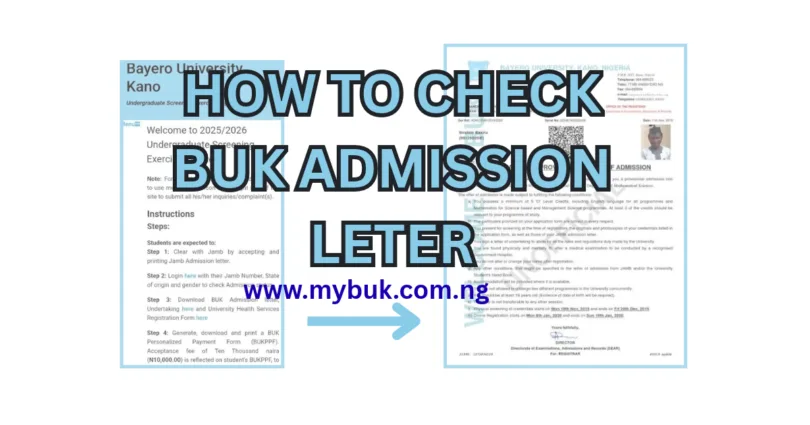
How to Check BUK Admission Letter 2026/2027: Candidates who have been offered admission into Bayero University, Kano (BUK) for the 2026/2027 academic session can proceed to check and download their BUK Admission Letter through the university’s official undergraduate screening portal.
The BUK Admission Letter is an important document that confirms your admission into the university. It contains relevant information about your admission, including your programme of study and other details required for subsequent registration and documentation.
However, candidates should understand that the BUK Admission Letter is different from the JAMB Admission Letter. While the JAMB Admission Letter is obtained through the JAMB e-Facility portal, the BUK Admission Letter is downloaded through the university’s admission screening platform.
If you have been offered admission into BUK, this guide explains how to check your admission letter, download it, print it and proceed with the next stage of registration for the 2026/2027 academic session.
Has BUK Released Admission Letters for 2026/2027?
The BUK 2026/2027 undergraduate admission list has been reported as released on JAMB CAPS. Candidates who participated in the admission screening exercise can check their individual admission status through their JAMB profiles.
However, seeing your name on JAMB CAPS and downloading your BUK Admission Letter are two different stages of the admission process.
After accepting your admission on JAMB CAPS and printing your JAMB Admission Letter, you should proceed to the BUK undergraduate screening portal when the 2026/2027 screening facility becomes available.
Requirements for Checking Your BUK Admission Letter 2026
Before attempting to access your BUK Admission Letter, prepare the following information:
- Your JAMB registration number.
- Your state of origin.
- Your gender.
- Your JAMB Admission Letter, showing that you have accepted the admission.
- An internet-enabled phone or computer.
These are the details required by BUK’s published undergraduate screening platform for checking admission status.
How to Check BUK Admission Letter 2026/2027: Step-by-Step
To easly acess, check and download your 2026 BUK admission letter, follow the steps below:
Step 1: Accept Your Admission on JAMB CAPS
Before proceeding to the BUK screening portal, ensure that you have accepted your admission on JAMB CAPS. Visit the JAMB e-Facility Portal, log in with your registered email address and password, and access your CAPS admission status.
If you have been offered admission into BUK, select the acceptance option and confirm your decision.
Step 2: Print Your JAMB Admission Letter
After accepting your admission, proceed to print your official JAMB Admission Letter.
You can access the admission letter service through the JAMB Admission Letter Portal.
Keep a copy of the document because BUK requires it during its undergraduate screening process.
Step 3: Visit the Official BUK Screening Portal
Open the official BUK undergraduate screening portal using the link below: https://mybuk2.buk.edu.ng/myScreening
This is the university’s screening platform for admitted undergraduate students.
Make sure you are using the official BUK website rather than an unofficial admission website.
Step 4: Enter Your Admission Details
On the screening portal, you will be required to provide your:
- JAMB Registration Number
- State of Origin
- Gender
Enter the information correctly and ensure that it corresponds with the details used during your admission application.
Step 5: Check Your Admission Status
After entering the required information, proceed to check your admission status.
If your admission details have been uploaded to the screening platform and the relevant session is available, the system should display your admission information.
Carefully confirm your details before proceeding.
Step 6: Download Your BUK Admission Letter
Once your admission status is available, locate the option for downloading your BUK Admission Letter.
Click the appropriate download link and save the document to your phone or computer.
You should also download the other relevant documents made available on the portal, including the Undertaking Form and University Health Services Registration Form, where applicable.
Step 7: Print Your BUK Admission Letter
After downloading the document, open the PDF file and print a clear copy.
Keep both the electronic and printed versions because you may need them during subsequent registration and physical documentation.
Difference Between BUK Admission Letter and JAMB Admission Letter
Many newly admitted students confuse these two documents. Although both are important, they serve different purposes.
| BUK Admission Letter | JAMB Admission Letter |
|---|---|
| Issued through BUK’s screening platform | Issued through JAMB e-Facility |
| Confirms admission through the university’s system | Confirms admission through JAMB |
| Used for BUK registration and documentation | Used for JAMB admission verification and university clearance |
| Downloaded from the BUK screening portal | Downloaded from the JAMB portal |
Important: BUK’s published screening instructions require admitted students to accept and print their JAMB Admission Letter before accessing the subsequent university admission documentation process.
What If I Cannot Find My BUK Admission Letter?
If you have accepted your admission on JAMB CAPS but cannot find your BUK Admission Letter, do not panic.
There are several possible explanations:
1. Your admission has not been updated on the BUK portal.
Your JAMB admission may have been processed before the university screening platform reflects your details.
2. The 2026/2027 screening portal is not yet available.
The existing BUK screening page may still display a previous admission session. Wait for the university to activate the appropriate 2026/2027 screening facility.
3. You entered incorrect information.
Check your JAMB registration number, state of origin and gender.
4. Your admission is still being processed.
If your admission was recently released, allow the university’s systems time to update.
If the problem continues, use the message-box icon on the BUK screening portal to submit an enquiry or complaint.
Can I Download My BUK Admission Letter Without Accepting JAMB Admission?
BUK’s published undergraduate screening procedure instructs admitted students to first accept their admission on JAMB CAPS and print the JAMB Admission Letter before proceeding to the university screening portal.
Therefore, you should complete your JAMB acceptance first.
Do not assume that seeing your name on a BUK admission list automatically completes the entire admission process.
What to Do After Downloading Your BUK Admission Letter
Downloading your admission letter is not the final stage of the admission process.
According to BUK’s published undergraduate screening procedure, admitted students are expected to complete additional steps.
These include:
- Accepting and printing the JAMB Admission Letter.
- Checking admission status on the BUK screening portal.
- Downloading the BUK Admission Letter and other relevant forms.
- Generating the BUK Personalised Payment Form (BUKPPF).
- Paying the applicable acceptance fee through the approved payment channel.
- Uploading the required admission documents.
- Printing the acknowledgement slip.
- Following the university’s subsequent registration and documentation instructions.
The exact fees, deadlines and registration instructions should be confirmed from the official 2026/2027 portal before making any payment.
Documents to Prepare After Receiving BUK Admission for 2026/2027
Newly admitted students should prepare their important academic and personal documents ahead of registration.
These include:
| Document | Purpose |
|---|---|
| JAMB Admission Letter | JAMB admission confirmation |
| BUK Admission Letter | University admission confirmation |
| JAMB Result Slip | UTME information |
| WAEC/NECO Result | O’Level qualification |
| Birth Certificate | Age verification |
| Certificate of Origin | Indigene verification, where required |
| BUK Acknowledgement Slip | Registration instructions |
| Acceptance Fee Receipt | Payment confirmation |
| Other required documents | As specified by BUK |
Keep clear digital copies of these documents in addition to the printed versions.
Important Advice for All Newly Admitted BUK Students
- Do not pay anyone who claims they can generate your BUK Admission Letter outside the official university portal.
- Also, avoid sharing your JAMB login details with admission agents or strangers.
- Use only the official BUK and JAMB platforms for admission-related activities.
- If you encounter a problem while accessing your admission information, contact the university through the official screening portal.
Frequently Asked Questions (FAQs)
1. How can I check my BUK Admission Letter for 2026/2027?
Visit the official BUK undergraduate screening portal at https://mybuk2.buk.edu.ng/myScreening/. Follow the instructions and provide your JAMB registration number, state of origin and gender to check your admission information when the 2026/2027 facility is available.
2. Is BUK Admission Letter the same as JAMB Admission Letter?
No. The BUK Admission Letter is obtained through the university’s screening portal, while the JAMB Admission Letter is downloaded through the JAMB e-Facility portal.
3. Do I need to accept admission on JAMB CAPS before downloading my BUK Admission Letter?
Yes. BUK’s published screening procedure instructs newly admitted students to accept their admission on JAMB CAPS and print their JAMB Admission Letter before proceeding to the university’s screening platform.
4. What details do I need to check my BUK Admission Letter?
You generally need your JAMB registration number, state of origin and gender.
5. Can I download my BUK Admission Letter using my phone?
Yes. You can access the BUK screening portal using a smartphone with an internet connection. You can save the admission letter as a PDF and print it later.
6. What should I do if my BUK Admission Letter is not showing?
First, confirm that you have accepted your admission on JAMB CAPS. Then check whether the 2026/2027 screening portal is active and whether your admission details have been updated. If the problem persists, contact BUK through the screening portal.
7. Do I need to print my BUK Admission Letter?
Yes. You should download and print a clear copy for your admission documentation and registration.
8. What happens after downloading my BUK Admission Letter?
Proceed with the university’s screening instructions, including acceptance-fee payment, document upload and printing of your acknowledgement slip, where required.
READ ALSO: How to Accept BUK Admission on JAMB CAPS 2026/2027 | Complete Steps
Conclusion
Checking and downloading your BUK Admission Letter is an important step for candidates admitted into Bayero University, Kano, for the 2026/2027 academic session. Before accessing the university’s screening platform, ensure that you have accepted your admission on JAMB CAPS and printed your JAMB Admission Letter.
Afterwards, visit the official BUK screening portal, provide the required details and download your university admission documents when the 2026/2027 facility becomes available.
Do not forget to complete the remaining registration requirements and monitor official BUK announcements for updates.
USEFUL LINKS/REFERENCES
- Official BUK Screening Portal: https://mybuk2.buk.edu.ng/myScreening/
- JAMB e-Facility Portal: https://efacility.jamb.gov.ng/
- BUK Official Website: https://www.buk.edu.ng/





Leave a Comment